Shelf for Mac

Put it down.
Pick it up anywhere.

Shelf is a floating tray for your Mac that appears the moment you start dragging. Park files there, hop between apps, and drop them where they belong.

Drop files hereSeveral at once become a stack
PDF
Q3 Report.pdf
PNG
Hero.png
KEY
Pitch.key
3 files · drop a file onto another to stack themClear all

Open the lid.

  1. 1Drag files from Finder onto the shelf.
  2. 2⌘‑click several and drag them to make a stack.
  3. 3Drop from the shelf into Mail. ⌥ Space toggles it.
Keep scrolling to open

What it does

There is not much to learn. This is the whole app.

It does nothing while it waits.

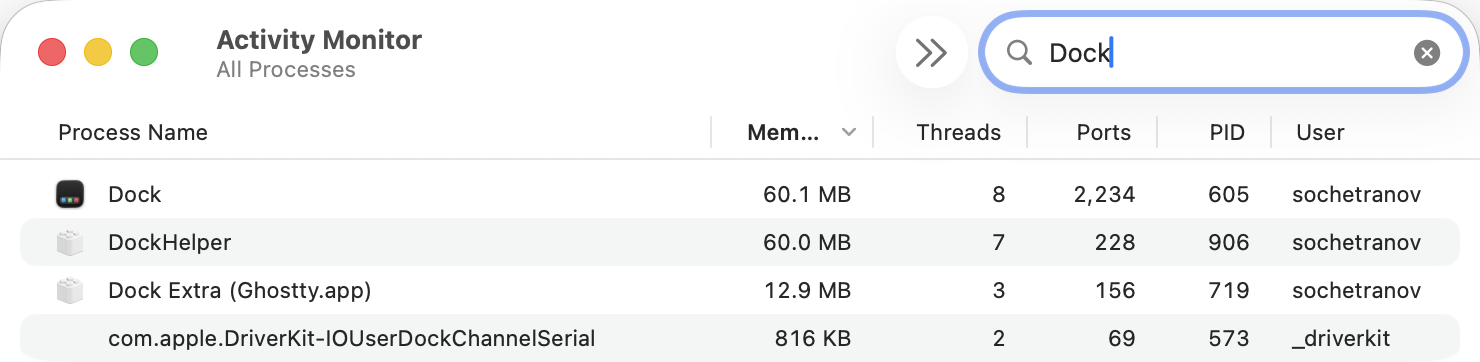
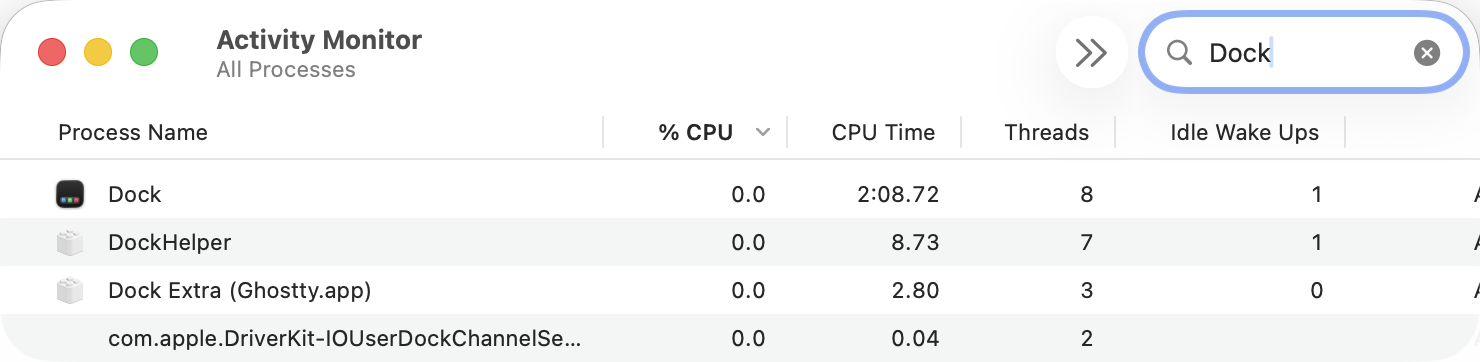
Shelf sits in the menu bar all day, so it has to be cheap to keep around. This is Activity Monitor on my own Mac, with Shelf next to the Dock that came with macOS. Same window, same columns. The only thing I changed is what I typed in the search box.

53.0 MBof memory. The Dock beside it wants 60.1 MB.
0.0%of the CPU while it waits for you to drag something.
0idle wake-ups, so it leaves the battery alone.

Shelf, running in the menu bar.
Activity Monitor with “shelf” in the search box. Shelf is using 53.0 MB of memory across 8 threads.
The Dock, for scale — it came with the Mac and it never stops running.
Activity Monitor with “Dock” in the search box. Dock is using 60.1 MB, and DockHelper another 60.0 MB.
Shelf, running in the menu bar.
Activity Monitor with “Shelf” in the search box, on the CPU tab. Shelf is at 0.0 per cent CPU with 0 idle wake ups.
The Dock, for scale — it came with the Mac and it never stops running.
Activity Monitor with “Dock” in the search box, on the CPU tab. Dock is at 0.0 per cent CPU with 1 idle wake up.

One Mac, one afternoon, one run of Activity Monitor. Your numbers will move around a little. The size of the thing you are leaving on will not.

$3.99, once.

That covers every Mac you own and every update I ship. There is no account to create and nothing to cancel later.

$3.99 one-time
purchase
Buy Shelf for $3.99
Want to try it first? The demo above is the real shelf.

Before you buy

These are the questions I get most. If yours is missing, write to me and I will answer it and add it here.

Is it really a one-time payment?
Yes. You pay $3.99 once. I do not charge again for updates or new versions.
Can I use it on more than one Mac?
Yes. One license covers every Mac you own. Install it wherever you work.
Which apps does it work with?
Any app that takes a dropped file: Mail, Slack, Figma, Finder, the upload box in a browser. If you can drop a file there from Finder, you can drop it from the shelf.
Where do my files go?
They stay where they are. The shelf keeps a link to the file, not a copy. Nothing is moved, duplicated, or uploaded. The app you drop into gets the original.
What if my Mac has no notch?
You still get a shelf. Where the notch would be, Shelf draws its own small tab under the menu bar, and you can drag that tab down to the left or the right edge of the screen. If you would rather have a floating panel, Settings → The panel → “Appears” offers Near the cursor, Where I dragged it, On the right edge and At the bottom. ⌥ Space opens the shelf wherever it lives.
Does Shelf need the Accessibility permission?
No. Shelf notices drags without it. The only permission it ever asks for is Automation for Finder, so it can ask Finder which files you have selected when you ⌥-click one. It comes up the first time you try it, and you can switch Option-click off in Settings if you would rather it never asked. Everything else works with no prompt at all.
Can I send files with AirDrop?
Yes. Drop a file on the AirDrop button in the shelf to send that one, or click the button to send the cards you have picked — the whole shelf if you have picked none. The files stay on the shelf either way.
Which macOS versions does it need?
macOS 14 Sonoma or later, on Apple silicon and Intel.
Why does macOS say it can’t verify Shelf?
Because Shelf is not notarised by Apple yet. That costs $99 a year and Shelf costs $3.99 once, so it is not paid for until enough of you have bought it. macOS blocks the first launch and you let it through in System Settings → Privacy & Security → Open Anyway. When the warning shows up, click Done and nothing else, then follow the steps here. One minute, once.
What happens after I pay?
Checkout runs through Paddle, my payment partner and merchant of record. When it is done you land on a page with your license key, and the same key goes to your email. Paste it into Shelf and you are set.
I lost my license key.
No problem. Type the email you bought with and every key on it comes back to your inbox. If nothing turns up, email me at sochetra12.nov@gmail.com with the Paddle receipt attached and I will make you one by hand.
Can I try it first?
Yes. The demo above runs the real shelf in your browser. Drag the files, make a stack, drop them into Mail.

Lost your license key?

Type the email you bought with. Every key on it goes back to your inbox in a minute or two.

Nothing came back, or the key never arrived in the first place? Email me the receipt and I will make you a key by hand, usually the same day.

Made by one person

Hi, I’m Sochetra Nov. I write Shelf on my own MacBook and I answer the support mail myself. Have a look at my code, or send me a message before you buy.

Download Shelf for Mac

Needs macOS 14 or later. Runs on Apple silicon and Intel.

Download for Mac Or buy a license first for $3.99 macOS blocks the first launch — the one-minute fix